
PC Repair in Bahrain – Fast & Reliable Computer Repair
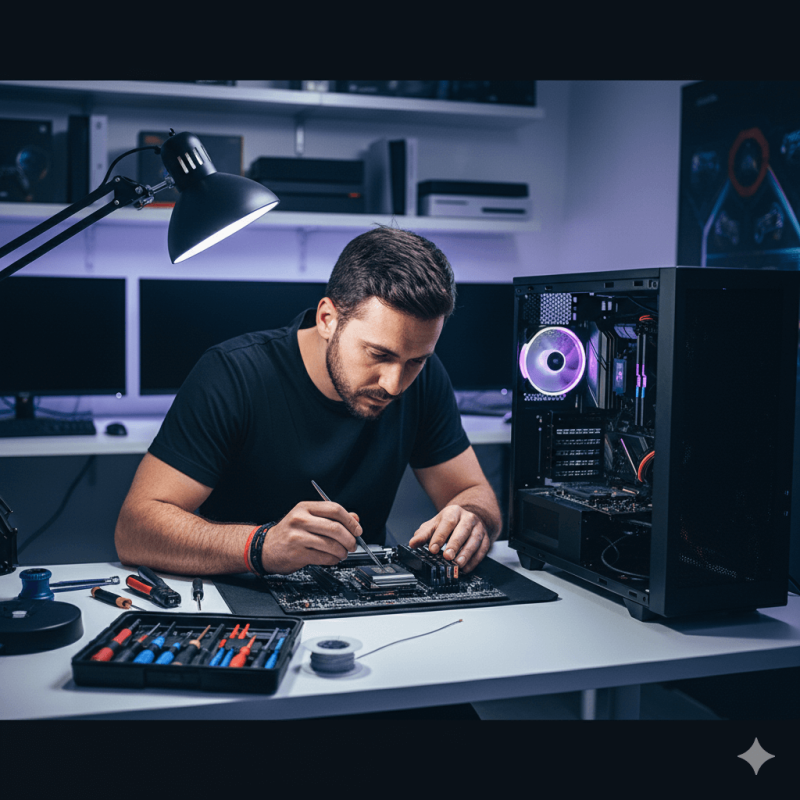
Is your PC running slow, overheating, crashing, freezing, or refusing to turn on? Games Gravity provides professional PC repair in Bahrain for gaming PCs, custom builds, and desktop computers with hardware, software, cooling, and performance problems.
Comprehensive PC Repair Services in Bahrain
A PC problem does not always make the faulty component obvious. Random shutdowns can be caused by power, cooling, memory, or motherboard problems, while a black screen may involve the GPU, RAM, display connection, or another part of the system.
Our PC repair services cover:
Power Supply Repair & Replacement
If your PC does not turn on, restarts unexpectedly, or shuts down while gaming, the power supply may need to be tested.
When replacement is required, we can help identify a suitable option based on your CPU, graphics card, connectors, and overall system requirements. You can also compare available PC power supplies and PSUs.
Motherboard Troubleshooting & Replacement
Motherboard problems can cause failed boots, unstable connections, component detection issues, memory problems, or a completely unresponsive PC.
We diagnose the system before recommending replacement because similar symptoms can also be caused by RAM, the power supply, CPU, or other components. If replacement is necessary, browse compatible AMD and Intel motherboards.
Graphics Card & GPU Diagnostics
Black screens, visual artifacts, game crashes, driver errors, overheating, and sudden performance drops can all indicate a graphics-related problem.
We check whether the issue is coming from the GPU itself, temperatures, drivers, power delivery, or another part of the computer. If replacement or an upgrade is needed, explore available graphics cards and GPUs.
RAM Testing & Memory Upgrades
Faulty or unstable memory can cause freezing, random restarts, blue screens, failed boots, and application crashes.
We can help identify memory-related problems and determine whether the existing RAM needs to be reseated, reconfigured, replaced, or upgraded. Compatible PC RAM for gaming and desktop systems is available in different capacities, speeds, DDR4, and DDR5 configurations.
CPU & Cooling Troubleshooting
High processor temperatures can reduce performance, cause thermal throttling, increase fan noise, or make a system unstable under load.
We can inspect CPU temperatures, cooler installation, fan operation, thermal performance, and compatibility. When a cooling upgrade is required, compare available CPU coolers in Bahrain.
SSD, HDD & NVMe Troubleshooting
Storage problems can cause slow startup, missing drives, boot errors, corrupted files, freezing, or applications that fail to load correctly.
We can help determine whether the issue involves the drive, operating system, connection, or another component. If replacement or additional capacity is needed, explore SSD, NVMe and PC storage options.
Gaming PC Repair in Bahrain
Gaming PCs place greater demands on graphics cards, processors, cooling systems, memory, storage, and power supplies than many everyday desktop computers.
A gaming PC may appear completely normal during browsing or office work but begin crashing, overheating, restarting, or losing performance once a demanding game places the system under load.
We troubleshoot gaming PC problems including:
- Games crashing or closing unexpectedly
- Low FPS or sudden performance drops
- GPU crashes or display problems
- CPU or GPU overheating
- Random shutdowns and restarts
- RAM instability
- Power problems under load
- Loud or incorrectly operating fans
- Problems after installing new hardware
- Slow loading or storage issues
Diagnosing the complete system helps determine whether the problem comes from one component or from several parts working together.
PC Overheating & Cooling Problems
High temperatures can reduce performance, increase fan noise, cause instability, or make a PC shut down during demanding workloads.
Common causes of overheating include:
- Dust buildup
- Restricted airflow
- Failed case fans
- Poor fan configuration
- CPU cooler problems
- Incorrect cooler installation
- Old or poorly applied thermal paste
- High CPU or GPU temperatures
- Cooling hardware that is not suitable for the installed components
If your system needs better cooling hardware, suitable CPU coolers and airflow upgrades can be considered based on your case, processor, motherboard, and current configuration.
If accumulated dust is the main issue rather than a hardware fault, Games Gravity also provides a dedicated PC cleaning service.
Software & Performance Optimization
A slow or unstable computer does not always have a failed hardware component.
Windows problems, drivers, corrupted system files, unwanted software, storage issues, and incorrect settings can also affect performance.
Software and performance troubleshooting can include:
- Windows installation and repair
- Startup and boot problems
- Driver errors and conflicts
- Slow PC troubleshooting
- Software crashes
- Virus and malware issues
- Storage and file system problems
- System configuration problems
- General performance optimization
The first step is determining whether the problem is caused by software, hardware, or a combination of both.
PC Upgrades in Bahrain
A computer does not always need repair. Sometimes the existing hardware is working correctly but no longer provides the performance required for newer games, applications, or workloads.
Common PC upgrades include:
- Graphics card upgrades
- RAM upgrades
- SSD and NVMe storage upgrades
- Processor upgrades
- Power supply upgrades
- CPU cooling upgrades
- Additional case cooling
Compatibility should always be checked before purchasing an upgrade.
A processor must match the motherboard socket and supported chipset. RAM must use the correct memory standard. A graphics card needs enough physical clearance and suitable power delivery. Storage drives must use interfaces supported by the motherboard.
If several major components need replacing, comparing the upgrade cost with a complete gaming PC build can help determine which option makes more sense.
Should You Repair or Upgrade Your PC?
Repairing the current computer often makes sense when one faulty component is preventing an otherwise capable system from working properly.
An upgrade may be more practical when the component already needs replacement and a newer compatible option can also improve performance.
For example, a failing storage drive can become an SSD upgrade, insufficient memory can be replaced with a higher-capacity RAM kit, or an older graphics card can be upgraded if the rest of the system can support it.
If an older PC requires a new motherboard, processor, RAM, power supply, storage, and other major components, replacing most of the existing system may offer less value than moving to a newer build.
The right choice depends on the fault, age of the PC, current performance, compatibility, and budget.
Why Choose Games Gravity for PC Repair in Bahrain?
Gaming PC & Hardware Experience
Games Gravity works with gaming PCs, custom builds, processors, graphics cards, motherboards, memory, storage, cooling hardware, and power supplies.
This helps us look at the computer as a complete system rather than treating every problem as an isolated component failure.
Diagnosis Before Replacement
Several different faults can produce similar symptoms.
A PC that shuts down under load does not automatically need a new PSU, and a black screen does not always mean the GPU has failed. Identifying the cause first can help avoid unnecessary component replacement.
Hardware & Upgrade Support
If a component needs replacing, compatibility with the rest of the system can be considered before selecting new hardware.
This is particularly important for CPUs, motherboards, RAM, GPUs, power supplies, storage, and cooling components.
Hardware and Software Troubleshooting
Not every repair is purely hardware-related.
Windows, drivers, storage, BIOS settings, software conflicts, and system configuration can also affect stability and performance, so both hardware and software should be considered during troubleshooting.
Local PC Repair in Bahrain
Games Gravity provides PC repair locally from our Samaheej / Galali location, allowing customers in Bahrain to bring gaming PCs and desktop computers for inspection and repair.
How Our PC Repair Process Works
1. Identify the Problem
We start by understanding what the computer is doing, when the problem occurs, and whether anything changed before the issue started.
Information such as error messages, crashes during gaming, unusual temperatures, new hardware, or recent software changes can help narrow down the cause.
2. Diagnose the System
The relevant hardware, software, temperatures, memory, storage, connections, or other components are checked based on the reported symptoms.
The goal is to identify the likely cause before recommending replacement parts.
3. Recommend the Right Solution
Once the problem is identified, the next step may involve repair, replacement hardware, software troubleshooting, cleaning, or an upgrade.
If more than one practical option is available, the solution should be based on compatibility, performance requirements, and the overall condition of the PC.
4. Repair and Test
After the required work has been completed, the system is tested again to confirm that the original problem has been addressed and the computer is operating correctly.
Most repairs are completed within 24–48 hours, although turnaround can vary depending on the fault, testing required, and availability of replacement components.
PC Repair for Gaming, Work & Everyday Computers
Different computers have different priorities.
A gaming PC may need stable GPU performance, effective cooling, sufficient power delivery, and consistent performance under load.
A work computer may depend more heavily on reliability, storage access, memory capacity, and stable everyday operation.
An older home computer may simply need a storage or RAM upgrade rather than replacing the complete system.
Understanding how you use the PC helps determine which repair or upgrade is the most practical solution.
PC Repair Shop in Bahrain
Games Gravity provides PC repair services for gaming PCs, custom builds, and desktop computers from our local store in Bahrain.
Location:
Shop 30, Building 84
Road 58, Block 236
Gulf Commercial Complex
Samaheej / Galali, Bahrain
Phone / WhatsApp: +973 3538 3410
Email: info@gamesgravity.net
Working Hours: Monday – Sunday, 12:00 PM – 12:00 AM
We serve customers from across Bahrain, including Samaheej, Galali, Muharraq, Manama, Riffa, Isa Town, and surrounding areas.
Frequently Asked Questions About PC Repair in Bahrain
How much does PC repair cost in Bahrain?
The cost depends on the fault, diagnosis required, labour involved, and whether replacement components are needed. A software problem, overheating issue, faulty PSU, motherboard fault, or graphics card problem can require very different repairs.
Do you repair gaming PCs?
Yes. Gaming PC troubleshooting can include GPU problems, overheating, RAM instability, storage issues, power supply faults, component compatibility, and performance-related problems.
Can you repair a PC that will not turn on?
Yes. A PC that does not start can have several possible causes, including the power supply, motherboard, RAM, power connections, or another component. The system should be diagnosed before deciding which part needs replacement.
Why does my PC turn on but show no display?
Possible causes include the graphics card, RAM, motherboard, monitor connection, display cable, BIOS configuration, or power delivery. Several different problems can create the same symptom.
Can an overheating gaming PC be repaired?
Yes. Overheating can involve dust buildup, airflow, case fans, the CPU cooler, thermal paste, GPU temperatures, or other cooling-related problems. The system should be inspected to determine the correct solution.
Can you upgrade my PC while repairing it?
Yes, when the existing system supports the upgrade. If a faulty component already needs replacement, moving to a compatible higher-specification part may make sense depending on the rest of the PC.
Can you upgrade my RAM or SSD?
RAM and storage can often be upgraded when the motherboard and system support the required hardware. The correct memory type, storage interface, available slots, and compatibility should be confirmed before purchasing.
Why is my gaming PC suddenly losing FPS?
Performance drops can be caused by overheating, drivers, background software, storage problems, RAM limitations, GPU issues, CPU limitations, or power-related problems. Diagnosing the system is more reliable than assuming one component is responsible.
Should I repair my old PC or replace it?
It depends on the repair cost, age of the computer, current performance, and how many major components need replacement. Repairing one faulty component can make sense, while replacing most of an outdated platform may offer less value than moving to a newer system.
Where can I get my PC repaired in Bahrain?
Games Gravity provides PC repair services from its location in Samaheej / Galali, Bahrain, for gaming PCs, custom systems, and desktop computers.