
Gaming RAM
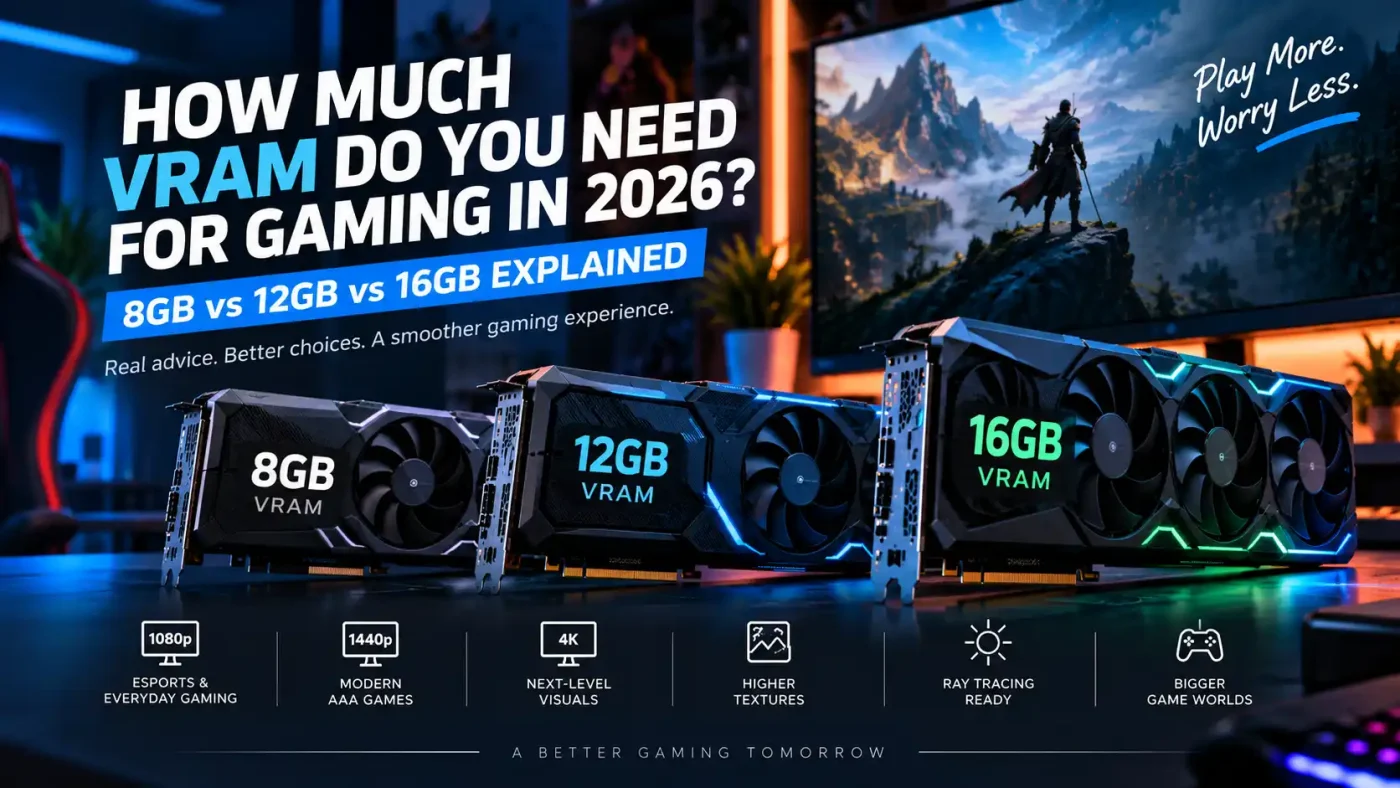
How Much VRAM Do You Need for Gaming in 2026? 8GB vs 12GB vs 16GB Explained
Sep
Graphics card specifications can become confusing quickly. Clock speeds, CUDA cores, stream processors, memory bandwidth, architecture, power consumption, and cooling all matter, but one specification receives more attention than almost any other: VRAM.
You may find one graphics card with 8GB of VRAM, another with 12GB, and another with 16GB. The obvious question is whether paying for more video memory actually improves your gaming experience.
The answer depends on more than a single number.
An 8GB graphics card can still be perfectly suitable for many games, especially at 1080p. Moving to 12GB gives modern games more room for demanding textures and higher resolutions, while 16GB provides additional headroom for heavier graphics settings, 4K gaming, ray tracing, mods and future titles.
However, VRAM capacity alone does not tell you which graphics card is faster.
This guide explains what VRAM actually does, how much you realistically need for gaming in 2026, and how to choose between 8GB, 12GB and 16GB without paying for memory you may never use.
What Is VRAM and Why Does It Matter for Gaming?
VRAM stands for Video Random Access Memory. It is dedicated memory located on or used by your graphics card to store the visual data the GPU needs while rendering a game.
This can include:
- Textures
- Frames being rendered
- Shadow data
- Lighting information
- Geometry
- High-resolution assets
- Ray tracing data
- Post-processing effects
The GPU needs quick access to this information. Keeping it in dedicated graphics memory allows the GPU to retrieve the required data much faster than repeatedly pulling it from slower system storage.
As games become visually more detailed, the amount of graphics data that needs to remain available can increase considerably.
That is why VRAM requirements tend to rise when you increase resolution, texture quality or advanced graphics settings.
VRAM Is Not the Same as System RAM
VRAM and your computer’s normal RAM perform different jobs.
System RAM supports Windows, games, browsers, applications and other processes running on your computer. VRAM is specifically used by the graphics subsystem.
A gaming PC with 32GB of system RAM does not suddenly give an 8GB graphics card 40GB of high-speed graphics memory.
When dedicated VRAM becomes full, the system may have to move some data between video memory and system memory. That can be considerably less efficient and may contribute to texture pop-in, inconsistent frame delivery or stuttering in demanding situations.
This is why both system RAM and VRAM need to be considered when planning a balanced gaming PC.
How Much VRAM Do You Need for Gaming in 2026?
There is no universal VRAM number that suits every gamer, but the following is a useful starting point.
| VRAM | Best Suited For |
|---|---|
| 8GB | 1080p gaming, esports, lighter games and sensible graphics settings |
| 12GB | 1080p ultra, strong 1440p gaming and more demanding modern titles |
| 16GB | High-end 1440p, 4K, heavy textures, ray tracing, mods and greater long-term headroom |
These are guidelines rather than strict rules.
A well-designed 8GB GPU can outperform an older or weaker 12GB card because GPU performance depends on the complete graphics processor, not only memory capacity.
When comparing graphics cards in Bahrain, consider the GPU itself, its architecture, VRAM, memory bandwidth, power requirements and the resolution you intend to play at.
Is 8GB VRAM Enough for Gaming in 2026?
For many gamers, yes.
8GB VRAM remains useful for 1080p gaming, competitive titles and games where you are comfortable adjusting graphics settings instead of automatically selecting the highest preset.
Popular esports-style games are generally less demanding on graphics memory than large open-world AAA releases with ultra-resolution texture packs.
An 8GB graphics card can therefore make sense for someone who mainly plays competitive games at 1080p and wants strong frame rates without spending more on hardware intended for higher resolutions.
The limitation appears when a game starts requiring more memory than the graphics card can comfortably provide.
Where 8GB Works Best
8GB is most suitable when you:
- Play primarily at 1080p
- Prefer esports or competitive games
- Use medium to high textures instead of maximum settings
- Do not regularly install high-resolution texture packs
- Are willing to adjust demanding graphics options
- Prioritize price over maximum future headroom
It is important to separate “can run a game” from “can run every setting at maximum.”
An 8GB GPU may deliver smooth performance in a game while requiring one or two memory-heavy options to be reduced.
Texture quality is often one of the first settings worth examining because higher-resolution textures can consume significant VRAM without always creating a dramatic visual improvement during normal gameplay.
When Can 8GB VRAM Become Limiting?
Problems are more likely to appear when several demanding factors are combined.
Imagine playing a visually intensive AAA game at 1440p with ultra textures, ray tracing, high-quality shadows and additional texture packs. The graphics card now has considerably more data to manage than it would at 1080p with high settings.
If the game exceeds available VRAM, you may encounter symptoms such as:
- Texture pop-in
- Uneven frame times
- Sudden stuttering
- Textures loading at lower quality
- Performance drops in complex scenes
That does not mean every performance problem is caused by insufficient VRAM.
CPU limitations, shader compilation, system RAM, storage speed, drivers and poor game optimization can produce similar symptoms.
Before replacing a GPU solely because of its memory capacity, check actual GPU usage and VRAM allocation while playing the games that matter to you.
Is 12GB VRAM Enough for Gaming in 2026?
For many gamers, 12GB represents a comfortable middle ground.
It provides more breathing room than 8GB without automatically pushing you into the price range of high-end 16GB graphics cards.
For 1440p gaming in particular, 12GB can provide a good balance between graphics quality, resolution and memory capacity.
Gamers who play a mixture of competitive games and visually demanding single-player releases are more likely to benefit from this additional headroom.
Who Should Consider 12GB?
A 12GB graphics card makes sense if you:
- Primarily game at 1440p
- Prefer high or ultra texture settings
- Regularly play modern AAA titles
- Want more headroom than an 8GB GPU
- Plan to keep the graphics card for several years
- Use ray tracing selectively
- Occasionally create content or use GPU-intensive applications
Current-generation systems are also available with different graphics configurations. For example, you can compare NVIDIA RTX 50 Series gaming PCs with different GPU and VRAM combinations instead of judging a system by VRAM alone.
That distinction is important.
A 12GB GPU is not automatically better than every 8GB GPU, just as a 16GB card is not automatically faster than every 12GB model.
Is 16GB VRAM Worth It for Gaming?
For gamers targeting demanding 1440p or 4K experiences, 16GB becomes considerably more attractive.
Higher resolutions increase the amount of visual information that needs to be processed. Modern games can also use detailed textures, large environments, complex lighting and advanced effects that place additional pressure on graphics memory.
16GB gives the graphics card more room to handle these workloads without operating close to its memory limit.
16GB VRAM Makes the Most Sense For
Consider 16GB if you:
- Play demanding games at 1440p or 4K
- Prefer maximum or near-maximum textures
- Use ray tracing
- Install high-resolution texture packs
- Play heavily modded games
- Use your GPU for video editing or 3D workloads
- Plan to keep your graphics card through several new game generations
It also provides more flexibility.
A gamer buying a new card today may currently use a 1440p monitor but upgrade to 4K later. Having additional VRAM can remove one potential limitation when the rest of the system is upgraded.
That does not mean everyone needs 16GB.
Someone playing esports games at 1080p is unlikely to gain meaningful value simply by buying more graphics memory if a less expensive GPU already provides the desired performance.
8GB vs 12GB vs 16GB VRAM for 1080p Gaming
1080p remains less demanding than 1440p and 4K, which makes 8GB much easier to work with.
For typical 1080p gaming:
8GB: Usually sufficient for mainstream gaming with reasonable settings.
12GB: Provides additional flexibility for demanding AAA games and high-resolution textures.
16GB: Offers plenty of memory headroom but may be unnecessary unless the GPU is also being purchased for future upgrades, content creation or particularly demanding workloads.
At this resolution, the GPU’s actual processing performance may matter more than simply moving from 8GB to 16GB.
Buying a slower GPU solely because it has more VRAM is rarely the best approach.
8GB vs 12GB vs 16GB VRAM for 1440p Gaming
1440p places greater demands on the graphics card and is where additional VRAM becomes more valuable.
8GB can still work, especially when graphics settings are optimized carefully.
However, 12GB offers more breathing room for newer games, high-resolution textures and demanding environments.
16GB provides even more headroom for gamers who want high settings, ray tracing, mods or a longer upgrade cycle.
For many 1440p buyers, 12GB to 16GB is therefore worth considering when the overall GPU performance and budget also make sense.
How Much VRAM Do You Need for 4K Gaming?
4K gaming significantly increases the workload placed on the GPU.
At this level, choosing a graphics card based solely on VRAM becomes particularly risky.
A graphics card could technically have 16GB of memory yet lack the processing power required to deliver the 4K frame rate you want.
For serious 4K gaming, 16GB is a sensible target for greater memory headroom, but you should also look closely at:
- Overall GPU performance
- Memory bandwidth
- Ray tracing performance
- Upscaling support
- Power supply requirements
- Cooling
- Target frame rate
- Monitor refresh rate
The complete GPU matters more than any single specification.
Does Ray Tracing Use More VRAM?
Ray tracing can increase graphics memory requirements because the GPU must manage additional information required for lighting, reflections, shadows and scene calculations.
How much extra memory is required depends on the game and the specific ray tracing effects being used.
This means a GPU that feels comfortable with traditional rasterized graphics may experience more memory pressure after demanding ray tracing features are enabled.
If ray tracing is important to you, additional VRAM headroom can be useful, but you must also make sure the GPU itself has enough processing performance to handle those effects.
Do High-Resolution Textures Increase VRAM Usage?
Yes.
Texture quality is one of the most important settings affecting VRAM consumption.
Higher-resolution textures contain more visual detail and require more memory.
This is why optional 4K texture packs can dramatically increase memory requirements even when the game itself performs well using its standard assets.
If your VRAM is near its limit, lowering texture quality by one level can sometimes reduce memory pressure without significantly changing the overall visual experience.
For an 8GB graphics card, this can be an effective way to extend the useful life of the hardware.
More VRAM Does Not Always Mean More FPS
This is one of the most common misunderstandings when buying a graphics card.
VRAM is capacity. It is not a direct measurement of processing speed.
Suppose one GPU has 16GB of VRAM and another has 12GB. The 12GB model could still produce significantly better gaming performance if it uses a more powerful GPU architecture, faster memory subsystem or stronger graphics processor.
More VRAM helps when your workload needs it.
Unused VRAM does not automatically generate additional frames.
When comparing graphics cards, look at the complete package:
- GPU model
- Architecture
- VRAM capacity
- Memory type
- Memory bandwidth
- Gaming benchmarks
- Resolution
- Power requirements
- Cooling design
- Price
This produces a much more realistic picture than sorting cards by memory capacity alone.
Should You Buy More VRAM for Future-Proofing?
Future-proofing should be approached carefully.
Games are likely to continue becoming more visually demanding, so additional graphics memory can provide useful headroom.
However, buying dramatically more VRAM than you currently need does not guarantee that a graphics card will remain fast enough for future games.
Eventually, GPU processing performance can become the limitation even if plenty of VRAM remains available.
A better strategy is to buy a balanced GPU for your expected resolution, games and upgrade cycle.
For example, someone planning to stay at 1080p may be better served by a strong 8GB or 12GB card than spending heavily on VRAM they will rarely use.
A gamer moving toward demanding 1440p or 4K gaming has a stronger reason to consider 12GB or 16GB.
How to Choose the Right VRAM for Your Gaming PC
Before buying a graphics card, answer these questions.
What Resolution Do You Play At?
1080p generally requires less graphics memory than 1440p, while 4K places the greatest demand on both GPU performance and memory.
What Games Do You Actually Play?
Someone playing competitive shooters has different requirements from someone playing large cinematic open-world games with ultra textures.
Check the recommended requirements for the specific games you intend to play rather than buying around hypothetical workloads.
How Long Will You Keep the GPU?
If you normally upgrade every two years, you may not need as much memory headroom as someone planning to keep the same GPU for four or five years.
Do You Use Mods?
High-resolution texture modifications and heavily modded games can increase graphics memory usage considerably.
Modding is one reason some gamers benefit from 16GB even when their monitor resolution alone would not necessarily require it.
Do You Use the GPU for Work?
Video editing, 3D rendering, AI workloads and other professional applications can have very different VRAM requirements from gaming.
If your PC serves both gaming and creative workloads, research the requirements of your main applications as well.
8GB, 12GB or 16GB: Which Should You Choose?
For most buyers, the decision can be simplified.
Choose 8GB if your priority is 1080p gaming, esports titles and getting good value while being comfortable adjusting demanding settings when required.
Choose 12GB if you want stronger flexibility for modern AAA gaming, particularly at 1440p, without automatically moving into a higher-end GPU tier.
Choose 16GB if you are targeting demanding 1440p or 4K gaming, ray tracing, high-resolution textures, heavy mods, creative workloads or greater memory headroom for the coming years.
Most importantly, do not choose a graphics card based on VRAM alone.
The best GPU is the one that delivers the performance you need at your preferred resolution while fitting your budget, power supply, case and overall PC configuration.
If you are building or upgrading a gaming setup in Bahrain, Games Gravity offers graphics cards and gaming PC configurations across different performance levels, making it easier to compare complete specifications rather than focusing on a single number.
Frequently Asked Questions About Gaming VRAM
Is 8GB VRAM still enough for gaming in 2026?
Yes. 8GB can still be sufficient for many games, particularly at 1080p. More demanding AAA games may require reduced texture or graphics settings when memory usage becomes high.
Is 12GB VRAM enough for 1440p gaming?
12GB is a strong capacity for many 1440p gaming scenarios. Actual performance still depends on the GPU model, game, graphics settings and whether demanding features such as ray tracing are enabled.
Is 16GB VRAM necessary for gaming?
Not for everyone. 16GB is most useful for demanding 1440p and 4K gaming, high-resolution textures, ray tracing, heavy mods and workloads that require additional graphics memory.
Does more VRAM increase FPS?
Not automatically. Additional VRAM helps when a game requires more memory than a lower-capacity GPU provides. If the game already fits comfortably within available memory, adding VRAM alone does not necessarily increase frame rate.
How much VRAM do I need for 4K gaming?
For a new GPU aimed at demanding 4K gaming, 16GB provides useful memory headroom. However, GPU processing performance is equally important because having enough VRAM does not guarantee good 4K frame rates.
Can you upgrade GPU VRAM later?
In normal consumer graphics cards, no. VRAM is installed as part of the graphics card and is not designed to be upgraded separately like system RAM. This makes VRAM capacity worth considering before buying a GPU.
What happens when a game uses all available VRAM?
When dedicated graphics memory becomes insufficient, the system may need to move data between VRAM and system memory. Depending on the game and hardware, this can contribute to stuttering, texture issues or inconsistent performance.
Is VRAM more important than GPU performance?
Neither should be considered in isolation. A graphics card needs enough VRAM for the intended workload, but its GPU must also provide enough processing performance. The strongest choice is usually a balanced card rather than the model with the largest memory number.